Acustica Audio Acqua Effect plug-ins and Marea software instruments may experience issues when used in FL Studio. These playback problems can affect audio quality, cause distortion such as pops and clicks, or, in some cases, lead to application crashes.
FL Studio provides a plug-in-specific setting called “Use fixed size buffers”, which can help improve stability and performance by preventing the use of variable-sized audio buffers.
Change the FL Studio settings as follows:
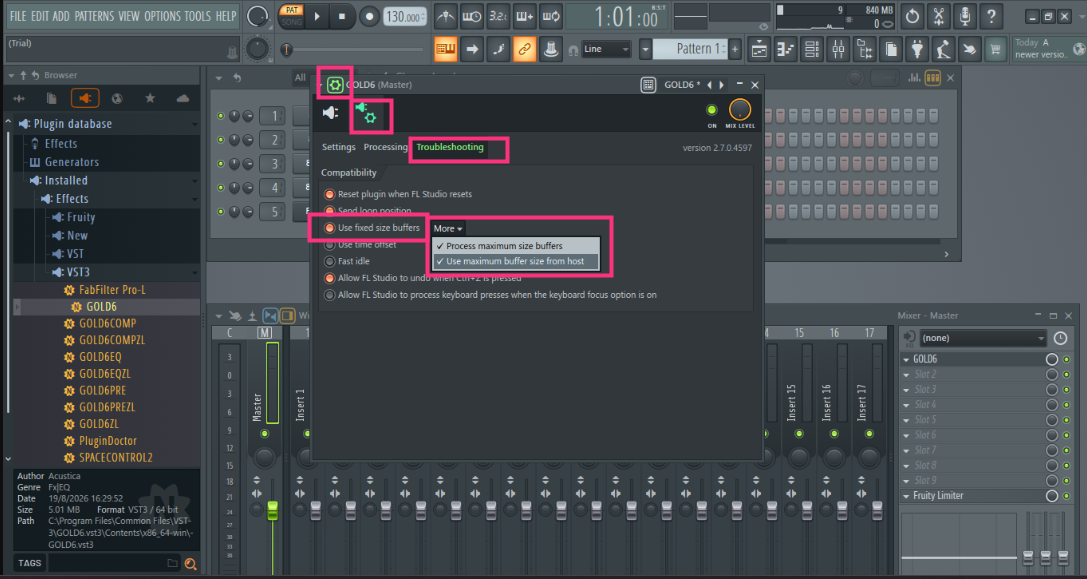
- Click the plug-and-gear icon in the upper-left corner of the plug-in window.
- Open the “Troubleshooting” tab.
- Enable “Use fixed size buffers.”
- Click “Yes” in the warning pop-up window.
- Click “More” and enable both options in the pop-up window.
The Acustica Audio single point of contact (SPOC) is the Acustica Audio help-desk portal. In order to access to Audio help-desk portal go to the Acustica Audio website and then to the support section. We do not provide help, assistance, or support via social networks, public forums, or through our email accounts.
Was this article helpful?
That’s Great!
Thank you for your feedback
Sorry! We couldn't be helpful
Thank you for your feedback
Feedback sent
We appreciate your effort and will try to fix the article