iCloud is not supported.
When files in the Documents folder are saved to the Apple's iCloud, Aquarius is unable to move the unzipped files from iCloud to the plug-in folder; therefore, iCloud should be disabled.
The "bad script" error is related to the final phase of product installation via the Aquarius Desktop application on macOS operating systems exclusively. In depth, although the downloaded files are successfully decompressed, the copy from the Stage Area to the plug-in folder fails due to a permissions issue.
The root cause of this problem typically stems from devices with legacy configurations from older equipment or previous operating system versions, where the old path did not have the current protections in place.
The following changes should be made manually:
- Purge the Aquarius Desktop stage area. To get more information on this topic, read and follow the solution in our knowledge base (KB): how to purge Aquarius Desktop application stage area.
- Go to your current profile folder located on /Users/[YOURUSER]/.
- Manually create the "Acustica" folder. ~/Acustica/ or /Users/[YOURUSER]/Acustica/.
- Manually create the "Aquarius" folder inside "Acustica" folder. ~/Acustica/Aquarius/ or /Users/[YOURUSER]/Acustica/Aquarius/.
- Manually create the "Stagearea" folder inside "Aquarius" folder. ~/Acustica/Aquarius/Stagearea/ or /Users/[YOURUSER]/Acustica/Aquarius/Stagearea/.
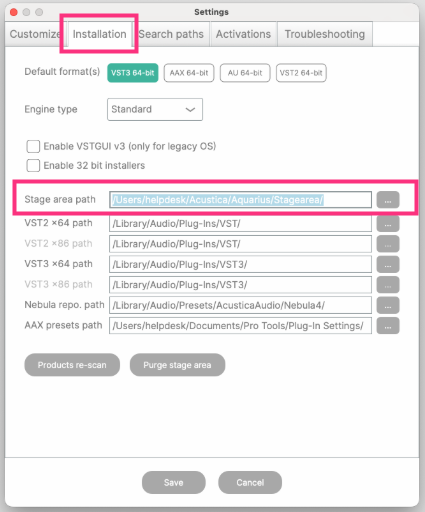
- Run the Aquarius Desktop application, go to settings, then the installation tab.
- In the Stage Area path, click the three dots and select the new Stage Area.
- Click save.
- Close the Aquarius Desktop application.
- Run Aquarius Desktop application again.
- Go to settings, then the installation tab.
- Verify that the new Stage Area path was saved correctly in the new path.
- Go to the troubleshooting tab.
- Enable logging by clicking the log file option (for more in-depth debugging if it is required).
- Click Save.
- Try installing the product again using the Aquarius Desktop application.
The Acustica Audio single point of contact (SPOC) is the Acustica Audio help-desk portal. In order to access to Audio help-desk portal go to the Acustica Audio website and then to the support section. We do not provide help, assistance, or support via social networks, public forums, or through our email accounts.Was this article helpful?
That’s Great!
Thank you for your feedback
Sorry! We couldn't be helpful
Thank you for your feedback
Feedback sent
We appreciate your effort and will try to fix the article